Claude Code + Obsidian changed how I work

I’m building, shipping, and running five products and a staff augmentation company. At any given moment there are 15 things competing for attention and I’ll have three new ideas before lunch.
For years my system was: write it down somewhere, forget where, rediscover it two weeks later. Obsidian helped. But Obsidian alone doesn’t do anything with the notes. It’s a second brain that doesn’t act.
Then I saw Greg Isenberg’s tweet about using Obsidian + Claude Code as a “24/7 personal operating system.” The idea clicked immediately. Not because it was new to me, I was already using both. But because I hadn’t connected them. My vault was over here, Claude Code was over there, and I was the bottleneck in between.
That changed when I plugged Claude Code into the vault.
Claude Code meets Obsidian
Claude Code is a CLI tool. It reads files, writes files, runs commands. Obsidian stores everything as markdown files in a folder. The connection is obvious once you see it: point Claude Code at your vault and suddenly your AI assistant has access to every project file, every daily note, every decision you’ve ever written down.
I set up project files for each product. A north star doc with priorities. Daily notes with what I’m working on. When I open Claude Code in the morning, it reads today’s context and already knows what matters. No briefing required.
The unlock isn’t “AI can read my notes.” The unlock is that context compounds. Every decision I write down, every project update, every priority shift becomes part of the system’s memory. Only two weeks in and Claude Code knows my projects better than any collaborator I’ve ever had. It knows which product needs a settings page, that I have a deadline on Friday, and that I hate unnecessary meetings. All because I wrote it down once.
For someone who multitasks across this many projects, that’s the difference between drowning and flowing.
What the setup actually looks like
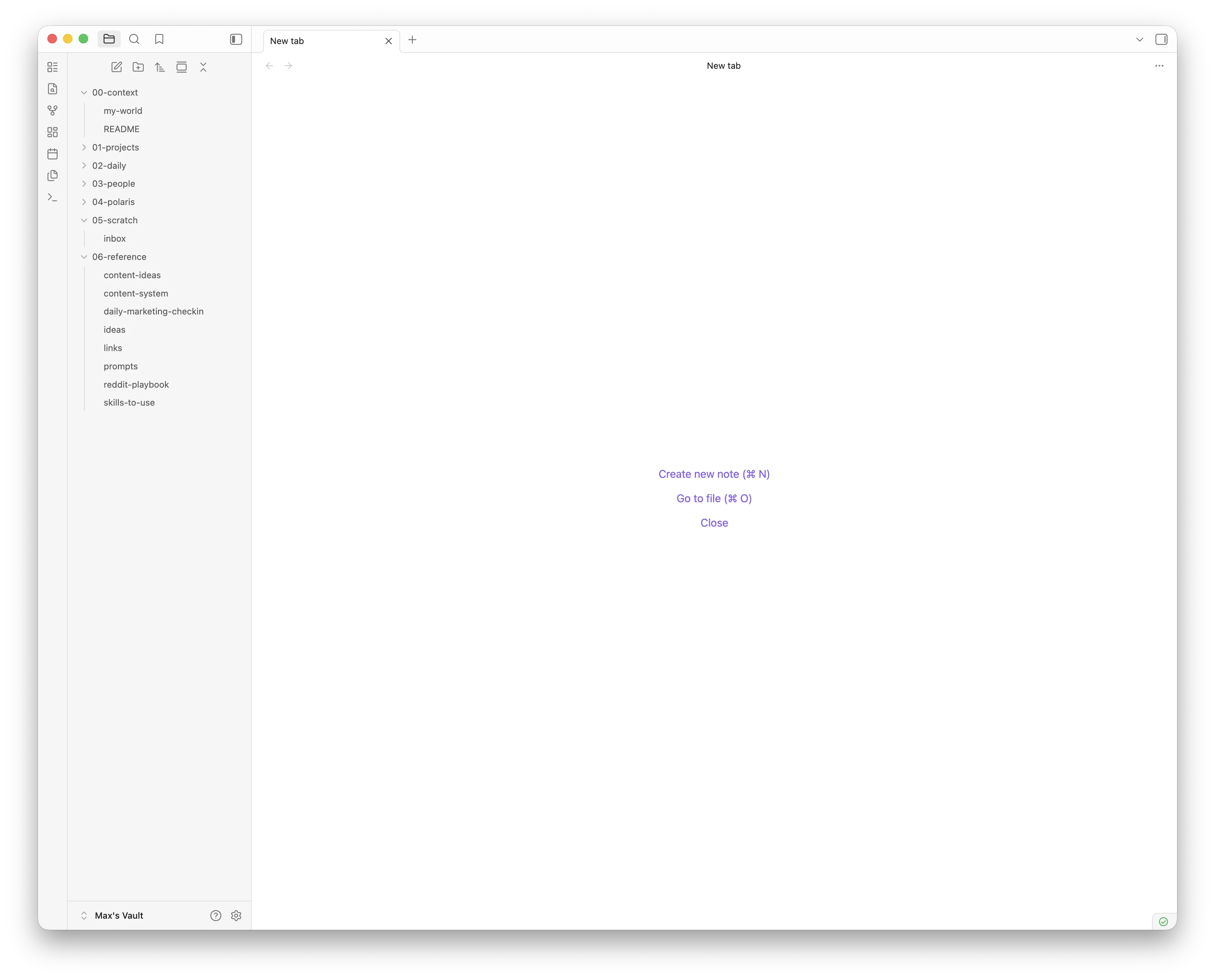
Each product gets a project file in Obsidian. It tracks what the product is, where it stands, recent decisions, and what’s next. I also keep a “Polaris” doc, a single file that lists my priorities in strict order so Claude Code never has to guess what matters most.
Daily notes capture what I’m working on each day. Not journaling. Just a few bullets: what happened, what I decided, what’s blocked. Over time, these become a log that gives Claude Code real context about how things are evolving.
When I start a Claude Code session in any project, I have custom prompts that pull from the vault first. “Read the project file. Read today’s daily note. Check Polaris.” It takes seconds and the session starts with full context.
The result is that I can context-switch between projects without the usual penalty. When I jump from tini.bio to Gratu to mx.works, Claude Code loads the right context each time. I don’t have to re-explain what I was doing last time. It already knows.
Why this works for multitaskers
Most productivity systems assume you’re doing one thing at a time. One project, one set of priorities, one workflow. That breaks down fast when you’re running multiple products.
What I needed wasn’t a better todo app or a fancier dashboard. I needed a system where writing things down once means never having to repeat myself, to anyone, human or AI.
Obsidian is the memory. Claude Code is the actor. Together, they give me something I’ve never had before: an assistant that actually has context. Not “here’s a summary of our last conversation” context. Real, accumulated, cross-project context built from months of decisions and notes.
And because it’s all just markdown files in a folder, there’s no lock-in. No proprietary format. No subscription tier that gates the features I need. Just text files and a CLI.
Getting started
If you want to try this yourself, here’s the minimum viable setup:
- Use Obsidian (or any markdown-based note system that stores files locally)
- Create a project file for each thing you’re working on
- Write daily notes, even just 3 bullets
- Point Claude Code at your vault directory
- Build prompts that read your context before doing anything else
That’s it. No plugins required. No special configuration. The power comes from the habit of writing things down and the compounding effect of AI having access to all of it.
If you want to follow along as I build this stuff, subscribe to the newsletter.